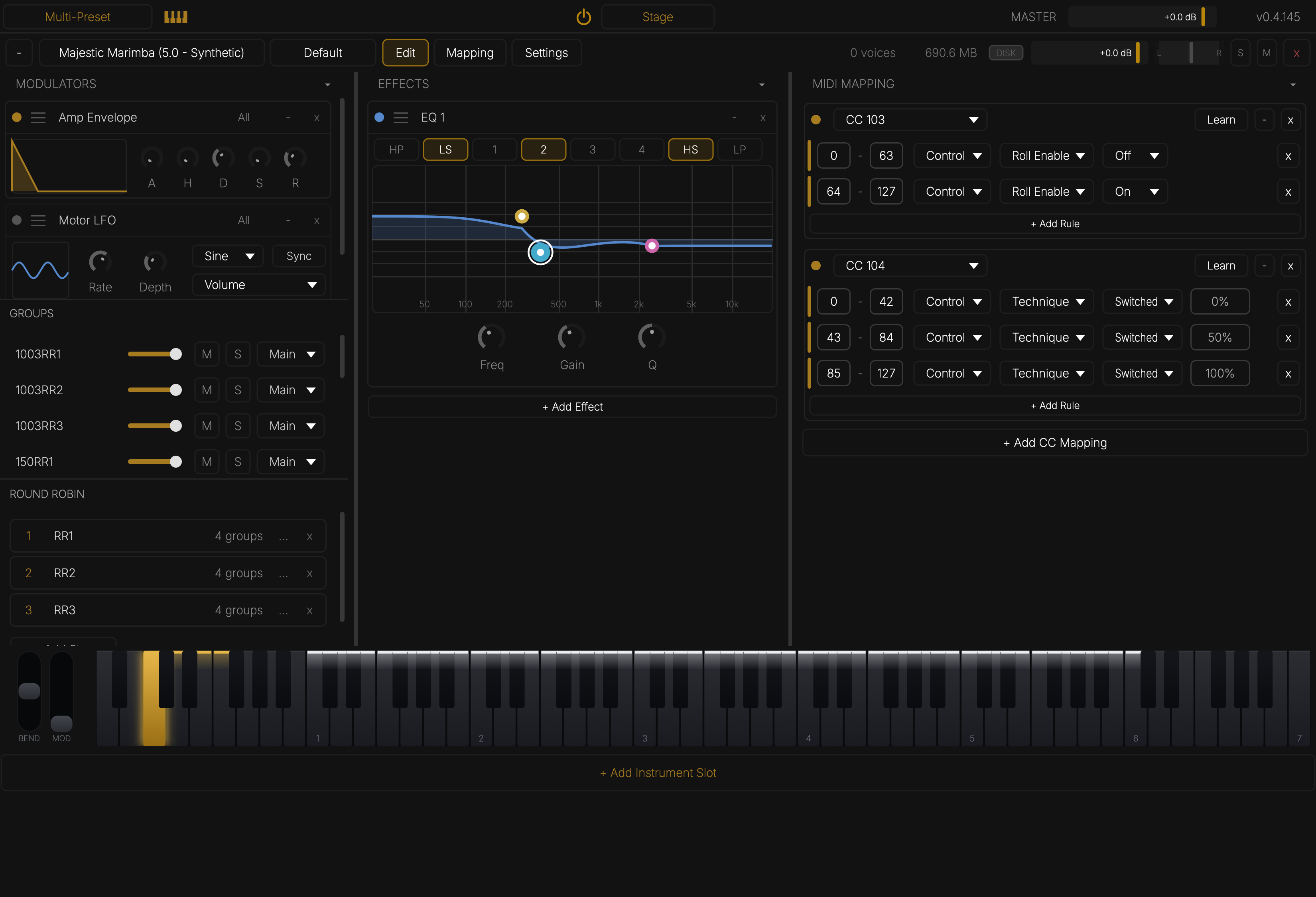
The Edit Tab
Edit opens the sound-design page: groups, modulators, effects, MIDI mapping, and round robin. This is where an instrument's behaviour is programmed — and everything here saves into the preset.

Groups
Every sample zone belongs to a named group (e.g. 1006RR1, 1006DryRR1 — one group
per mallet, articulation, and round-robin variation). The group rack gives each group a
volume, Mute, Solo, and an output bus. Groups are the currency the rest of the
engine trades in: keyswitches enable them, round robin rotates them, and MIDI mapping
rules allow or disallow them.
Modulators
- Amp Envelope — AHDSR with a drawn response curve. Long releases let samples ring out their natural tails; short releases give you note-length control from the score.
- Motor LFO — the vibraphone motor: rate, depth, waveform, and tempo sync.
Modulators can target all groups or a chosen subset (All / – selector on the header), so one instrument can hold, say, separate envelopes for wet and dry samples.
Effects
+ Add Effect builds a per-instrument chain. The EQ offers HP/LP, shelves, and four parametric bands with a draggable response display. Effects can be switched by MIDI mapping rules with per-note semantics — a keyswitch can turn on a low-pass EQ that affects only new notes, leaving ringing notes untouched (a felt-mallet emulation, for example).
MIDI Mapping
The MIDI mapping rack is the instrument's rulebook: each mapping listens to a CC (or a keyswitch) and runs its rules whenever a value arrives. A rule is:
value range min–max → action → target groups / modulators / effects
Actions:
| Action | Effect |
|---|---|
| Allow / Disallow | Gate which groups can start new notes (ringing notes are untouched) |
| Release | Immediately release all voices in the target groups |
| Mute / Unmute / Toggle | Hard-mute groups (affects ringing notes too) |
| Solo / Unsolo / Toggle | Solo groups |
| Parameter | Drive a parameter continuously — including Sustain Pedal, Sustain Pedal (Gated), and EQ Enabled/Disabled |
Learn binds the mapping to the next CC you move.
The classic vibraphone pedal setup
Wet (pedal-up-sustaining) and dry (damped) samples live in separate groups, and CC64 picks between them:
0–63 → Disallowwet groups,Allowdry groups — pedal up plays damped samples.64–127 → Allowwet,Disallowdry — pedal down plays ringing samples.0–63 → Releasewet groups — lifting the pedal damps notes that are still ringing.
These rules are already programmed into the factory vibraphone presets — the Pedal preset variant answers CC64 exactly like a real damper bar.
Sustain pedal targets
For single-sample instruments there are two pedal behaviours under the Parameter action:
- Sustain Pedal — piano-style: the pedal holds released notes.
- Sustain Pedal (Gated) — vibraphone/chimes-style: only the pedal sustains. Pedal up, a strike plays its attack and immediately damps, no matter how long the key is held; pedal down lets everything ring, and pressing it re-catches notes that were still fading.
Nothing responds to CC64 unless a mapping says so — a marimba will never be muted by a stray pedal from the host.
Round Robin
Round-robin steps are sets of groups that rotate per strike, so repeated notes cycle through alternate recordings. During rolls the rotation applies per re-strike. Steps are chosen randomly (never the same twice in a row) and intersect with whatever the active keyswitch allows.